Complete Online Business Solutions for Real Estate Agents

How do I edit search towns?
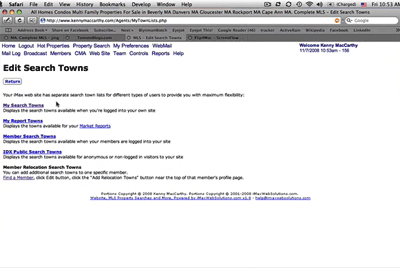
View Tutorial About Search Towns
Your iMax web site has separate search town lists for different types of users to provide you with maximum flexibility.
There are 5 different types of users:
1. Subscribers
2. Members
3. Public
4. Team Associate
5. Relocation
To maximize search benefits, each user type has a different search town list:
Subscriber Search Towns
1) Subscriber must login.
2) Click the "Property Search" or the "My Preferences" button at top of screen.
3) On the "Property Search" page or the "My Preferences" page, click the "Edit Search Towns" link.
4) Select "My Search Towns."
Member Search Towns
1) These towns are typically the Subscriber's Market Area.
2) Subscriber must login.
3) Click the "Property Search" or the "My Preferences" button at top of screen.
4) On the "Property Search" page or the "My Preferences" page, click the "Edit Search Towns" link.
5) Select "Member Search Towns."
Public (IDX) Search Towns
1) If IDX searches are enabled by Subscriber, any user can run a Public Search.
2) Subscriber must login.
3) Click the "Property Search" or the "My Preferences" button at top of screen.
4) On the "Property Search" page or the "My Preferences" page, click the "Edit Search Towns" link.
5) Select "IDX Public Search Towns."
Team Associate Search Towns
1) Team associate must login.
2) Click the "Property Search" or the "My Preferences" button at the top of the screen.
3) On the "Property Search" page or the "My Preferences" page, click the "Edit Search Towns" link.
4) Select "My Search Towns."
Relocation Search Towns
1) Each Member may have unique Search Towns called "Relocation Towns."
2) Subscriber or Team must login.
3) Click the Members button at the top of the screen.
4) Find your Member.
5) Click the "Edit" link under "Edit Profile."
6) Click the "Add Relocation Towns" button.
7) See "Add Search Towns - Edit Page" for additional instructions.
Continue: How do I add search towns?
100 Cummings Center, Suite 104F • Beverly, MA 01915
phone: (978) 927-9102 E-Mail iMaxWebSolutions.com